Client approval
Your client approves from a link. No account.
An agency gets its posts approved without opening its workspace to the client. The client gets an email, reads the post, and answers from the page, on their computer or on their phone.
How it works, in three steps
You submit.
A post submitted for approval does not go out. From its page, an administrator asks the client for approval and enters their address. The client needs no account.
They read.
They get an email in the workspace's language, and a link that opens only this post: its text, its link, its images and its destinations.
They answer.
They approve, or request a change by writing what needs changing. Administrators and the owner get an email for every decision, reason included.
What your client sees
The brand, the text, the image, the destination networks, then two buttons. Nothing else: no navigation, no sign-in, no sales pitch.
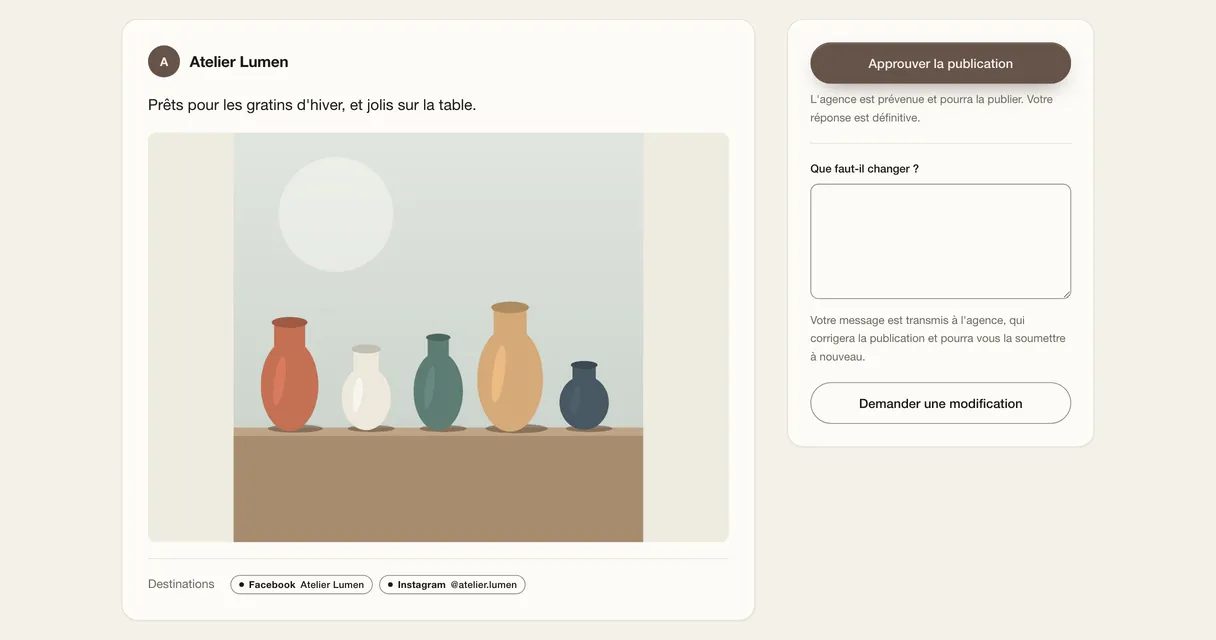
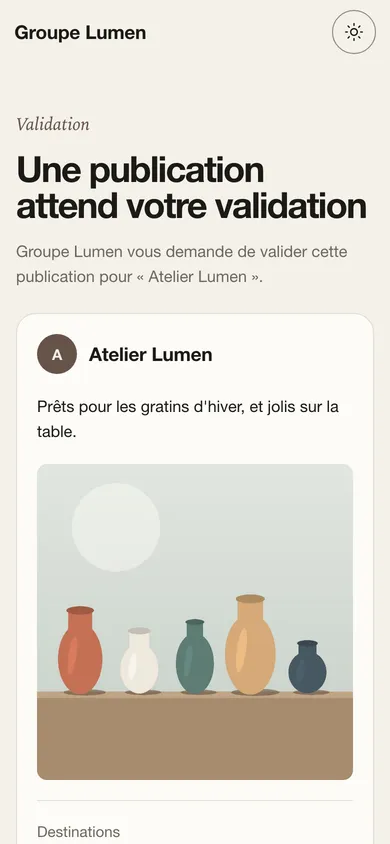
Approve or request a change
Approving does not publish: the post moves to Approved and waits for the team to choose its date. Nothing goes out without the agency acting.
A change request sends the post back to draft, with the client's reason. It stays in the to-fix list until it is sent back: saving the correction and resending it to the client is a single action, with a new link, to the address of the person who answered.
Several posts, one link
Select posts from the same brand and send them together, up to 50 per link. The client answers each one, or approves them all at once after confirming they have read everything.
A batch never mixes two brands: one client does not see another client's posts.
One reminder, only one
With no answer after 2 days, the client gets a reminder, once. The post's page shows the date the reminder is due, and when the link was sent.
A link that stays private
- The token is in the path of the address, never in a query parameter, and opens only the posts that were sent.
- The page asks search engines not to index it, and does not pass its address on to the sites it links to.
- The number of visits per minute is limited, to discourage anyone trying addresses at random.
- The link closes as soon as a decision is made, or as soon as the post no longer awaits approval, and 90 days after the request at the latest. A new request replaces the old link.
- A closed link shows “This link is no longer active”, without saying why.
What approval does not do
- No multi-level approval: one step, by the team or by the client.
- No annotations on the image and no comment thread: the client writes their reason in one go.
- No client access to the workspace or the calendar.
- No automatic publishing on approval: the team keeps control of the date.
Which plans include it
Client approval is included in Studio (€19 excl. tax a month) and in Agency (€39 excl. tax a month). Approval by a team member does not depend on the plan; it needs at least two members, since nobody approves their own post.
During the beta, every accepted account gets Studio rights, client approval included.
Frequently asked questions
Does my client need to create an account?
No. The link is enough, with no account or password, and it opens only what you sent them.
What happens if my client does not answer?
A reminder goes out after 2 days, only once. The link stays valid for up to 90 days after the request; after that, send a new one.
Can the client approve on their phone?
Yes. The page adapts to the phone, and there is nothing to install.
Who can send a request to the client?
The workspace's administrators and owner.
Is approving the same as publishing?
No. Approval makes the post ready to publish; the team then chooses its date, or publishes it right away.