Agencies and freelancers
Every client's social media, in one place.
Quiet Social is built for publishing on behalf of others: one brand per client, one calendar for all of them, and a client who approves from a link. The price follows the number of brands, not the number of people.
One brand per client, all its networks
Each client becomes a brand in your workspace, with its own name, logo, language and time zone. Its destinations sit under it: Mastodon account today; Facebook Page, Instagram professional account, LinkedIn page, Threads and Pinterest boards as each network opens its access; Bluesky account once it opens.
A plan includes a number of brands, and each brand comes with all its networks: connecting Pinterest for a client does not change the price. An extra brand is billed one at a time.
One calendar for all your brands
By month or by week, filtered by brand or by status. A post can be moved or duplicated without reopening the form, and each network keeps its own status: a failure on one does not hide the others, and is retried on its own.
A template keeps a text, a link, hashtags and, for a brand, its destinations and images. It never goes out and does not count towards the quota.

What needs your attention
The dashboard opens on five numbers. Each one leads to the list of what it counts, and changes colour as soon as it is no longer zero.
To approve
Posts submitted for approval, and those waiting for the client's answer.To fix
Posts on which the client has requested a change, with their reason.To schedule
Posts that are approved and waiting for their date.Failed deliveries
A network refused: the reason is shown, and the retry only touches that network.Accounts to reconnect
An authorisation that was withdrawn or is about to expire.Approval by your client, with no account
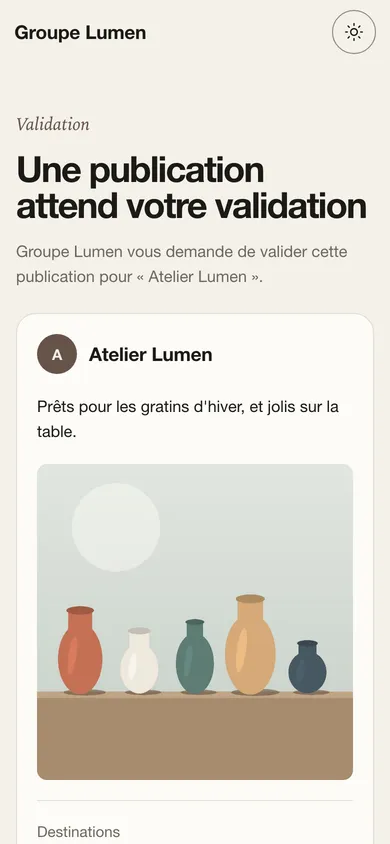
Your client gets a link that opens only the posts to approve. They approve, or request a change and say why; with no answer after 2 days, they get a reminder. They have no account, no password and no access to your other clients.
Members, not seats
The price does not multiply with every person. Solo allows 2 members; Studio and Agency, as many as you need. Each person gets the role they need, no more and no less.
Nobody approves their own post: a reviewer, an editor or an administrator does it, or your client through their link.
- Owner
- The whole organization, billing included
- Administrator
- Brands, connections, members and API
- Editor
- Writes and schedules
- Reviewer
- Approves before sending
- Viewer
- Reads, without changing anything
Each brand's time zone
One client in Montreal, another in Paris: each brand has its own time zone, and a post's time is read and scheduled in its brand's. Emails sent to a client go out in the workspace's language.
The activity log
Every action is kept for 365 days: who created, edited, approved or published what, and when. When a network withdraws its authorisation, administrators are told by email and in the application.
Freelancers: start with Solo
Solo includes 2 brands and 2 members for €7 excl. tax a month, with extra brands at €4. Client approval and the API start with Studio, at €19 excl. tax a month. During the beta, every accepted account gets Studio rights for free.
What we do not do
If one of these is essential to you, another tool will serve you better, and our comparisons say which one.
- Performance reports and account statistics: on Mastodon, we only read the public counters of each post.
- An inbox for messages and comments.
- Social listening and competitor tracking.
- Built-in AI writing: your own assistant works through our MCP server.
- White-label reports.
- A queue of time slots: every post has its own date.
- Multi-level approval, annotations and comment threads.
- TikTok, X, YouTube and Google Business Profile.
- Importing posts scheduled in another tool.
Frequently asked questions
How many clients can I manage?
As many as you have brands: 2 on Solo, 5 on Studio, 15 on Agency, then extra brands one at a time. Each brand can publish up to 1,000 times a month.
Do my clients see the other brands?
No, because they never enter the workspace: they receive links that open only their own posts. Your team members, on the other hand, see every brand in the workspace.
Can I work on my own?
Yes: Solo is made for that, and the free plan lets you try it on one brand with no credit card.
Can we publish from our own website?
Yes, from Studio: an idempotent API, signed webhooks, a Laravel package and a Filament plugin.
Pricing
Three plans based on the number of brands, a free plan to try it, and yearly billing at the price of ten months. Every open network is included in every plan.